KolmoPDF Solutions · United States

Solutions

Agents · datasheets

Claude Code can’t use that PDF until it’s clean Markdown

The agent can read a file in the repo. It cannot see a scanned pin table the way you can. Put the datasheet in Markdown first.

  1. 01

    Upload the spec PDF

    Datasheet, protocol, mechanical drawing excerpt — the file you keep pinning in Slack.

  2. 02

    Download Markdown

    KolmoPDF keeps tables, units, and code-like pin names. Drop spec.md in the repo.

  3. 03

    @file it in Claude Code or Cursor

    The agent now has columns, not a blob. Ask for a driver stub or a checklist against the table.

Source PDF

Repo Markdown

1 Features

Industry-Standard Dual Operational Amplifiers

  • Wide supply range of 3V3\text{V} to 36V36\text{V} (B, BA versions)
  • Quiescent current: 300μA/ch300\mu\text{A}/\text{ch} (B, BA versions)
  • Unity-gain bandwidth of 1.2MHz1.2\text{MHz} (B, BA versions)
  • Common-mode input voltage range includes ground, enabling direct sensing near ground
  • 2mV2\text{mV} input offset voltage maximum at 25C25^{\circ}\text{C} (BA version)
  • 3mV3\text{mV} input offset voltage maximum at 25C25^{\circ}\text{C} (A, B versions)
  • Internal RF and EMI filter (B, BA versions)
  • On products compliant to MIL-PRF-38535, all parameters are tested unless otherwise noted. On all other products, production processing does not necessarily include testing of all parameters.

2 Applications

  • Merchant network and server power supply units
  • Multi-function printers

• Power supplies and mobile chargers

  • Motor control: AC induction, brushed DC, brushless DC, high-voltage, low-voltage, permanent magnet, and stepper motor

• Desktop PC and motherboard

• Indoor and outdoor air conditioners

• Washers, dryers, and refrigerators

• AC inverters, string inverters, central inverters, and

voltage frequency drives

• Uninterruptible power supplies

• Electronic point-of-sale systems

3 Description

The LM358B and LM2904B devices are the next-generation versions of the industry-standard operational amplifiers (op amps) LM358 and LM2904, which include two high-voltage (36V) op amps. These

devices provide outstanding value for cost-sensitive applications, with features including low offset (300μ300\muV, typical), common-mode input range to ground, and high differential input voltage capability.

The LM358B and LM2904B op amps simplify circuit design with enhanced features such as unity-gain stability, lower offset voltage maximum of 33mV (22mV maximum for LM358BA and LM2904BA), and lower quiescent current of 300μ300\muA per amplifier (typical). High ESD (22kV, HBM) and integrated EMI and RF filters enable the LM358B and LM2904B devices to be used in the most rugged, environmentally challenging applications.

The LM358B and LM2904B amplifiers are available in micro-sized packaging, such as the SOT23-8, as well as industry standard packages including SOIC, TSSOP, and VSSOP.

Package Information

Family Comparison

SpecificationLM358B
LM358BA
LM2904B
LM2904BA
LM358
LM358A
LM2904LM2904V
LM2904AV
LM258
LM258A
LM158
LM158A
Units
Supply voltage3 to 363 to 363 to 303 to 263 to 303 to 303 to 30V
Offset voltage (max, 25°C)± 3
± 2
± 3
± 2
± 7
± 3
± 7± 7
± 2
± 5
± 3
± 5
± 2
mV
Input bias current (typ / max)10 / 3510 / 3520 / 250
15 / 100
20 / 25020 / 25020 / 150
15 / 80
20 / 150
15 / 50
nA
Gain bandwidth product1.21.20.70.70.70.70.7MHz
Supply current (typ, per channel)0.30.30.350.350.350.350.35mA
ESD (HBM)20002000500500500500500V
Operating ambient temperature–40 to 85–40 to 1250 to 70–40 to 125–40 to 125–25 to 85–55 to 125°C

(1) For all available packages, see the orderable addendum at the end of the data sheet. (2) The package size (length ×\times width) is a nominal value and includes pins, where applicable.

PART NUMBER(1)PACKAGEPACKAGE SIZE(2)
LM358B, LM358BA, LM2904B, LM2904BA, LM358, LM358A, LM2904, LM2904V, LM258, LM258AD (SOIC, 8)4.9mm × 6mm
LM358B, LM358BA, LM2904B, LM2904BA, LM358, LM358A, LM2904, LM2490VPW (TSSOP, 8)3mm × 6.4mm
LM358B, LM358BA, LM2904B, LM2904BA, LM358, LM358A, LM2904, LM2904V, LM258, LM258ADGK (VSSOP, 8)3mm × 4.9mm
LM358B, LM358BA, LM2904B, LM2904BADDF (SOT-23, 8)2.9mm × 2.8mm
LM358, LM2904PS (SO, 8)6.2mm × 7.8mm
LM358, LM2904, LM358A, LM258, LM258AP (PDIP, 8)9.81mm × 9.43mm
LM158, LM158AJG (CDIP, 8)9.6mm × 6.67mm
LM158, LM158AFK (LCCC, 20)8.89mm × 8.89mm

Table of Contents

1 Features ........................................................... 1 2 Applications ......................................................... 1 3 Description .......................................................... 1 4 Pin Configuration and Functions .............................. 3 5 Specifications ....................................................... 4 5.1 Absolute Maximum Ratings ............................. 4 5.2 ESD Ratings .................................................. 4 5.3 Recommended Operating Conditions ................... 5 5.4 Thermal Information ........................................ 5 5.5 Electrical Characteristics: LM358B and LM358BA.... 6 5.6 Electrical Characteristics: LM2904B and LM2904BA................................................ 8 5.7 Electrical Characteristics: LM358, LM358A ........... 10 5.8 Electrical Characteristics: LM2904, LM2904V ....... 11 5.9 Electrical Characteristics: LM158, LM158A .......... 12 5.10 Electrical Characteristics: LM258, LM258A ......... 14 5.11 Typical Characteristics: LM358B and LM2904B ..... 15 5.12 Typical Characteristics: LM158, LM158A, LM258, LM258A, LM358, LM358A, LM2904, and LM2904V................................................ 22 6 Parameter Measurement Information ........................ 24

Table of Contents

Table of Contents

7 Detailed Description .................................................... 25 7.1 Overview .............................................................. 25 7.2 Functional Block Diagram: LM358B, LM358BA, LM2904B, LM2904BA ........... 25 7.3 Feature Description ................................................. 26 7.4 Device Functional Modes ............................................. 26 8 Application and Implementation ....................................... 27 8.1 Application Information ............................................. 27 8.2 Typical Application .................................................. 27 8.3 Power Supply Recommendations ...................................... 28 8.4 Layout ................................................................. 28 9 Device and Documentation Support ..................................... 30 9.1 Receiving Notification of Documentation Updates ................. 30 9.2 Support Resources ................................................... 30 9.3 Trademarks ........................................................... 30 9.4 Electrostatic Discharge Caution .................................... 30 9.5 Glossary ............................................................. 30 10 Revision History ...................................................... 30 11 Mechanical, Packaging, and Orderable Information ................... 32

4 Pin Configuration and Functions

Image source
<img src="https://www.kolmopdf.com/images/sk-72e2d70ad175490c80c14b553bdd1e3a/579/3-2.png" style="zoom: 70%; display: block; margin: 0 auto;" />

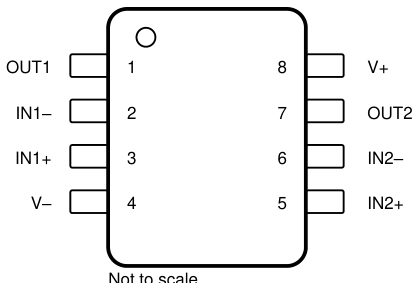
Figure 4-1. D, DDF, DGK, P, PS, PW, and JG Package 8-Pin SOIC, SOT23-8, VSSOP, PDIP, SO, TSSOP, and CDIP Top View

Image source
<img src="https://www.kolmopdf.com/images/sk-72e2d70ad175490c80c14b553bdd1e3a/579/3-10.png" style="zoom: 70%; display: block; margin: 0 auto;" />

Table 4-1. Pin Functions

(1) For a listing of which devices are available in what packages, see Section 3.

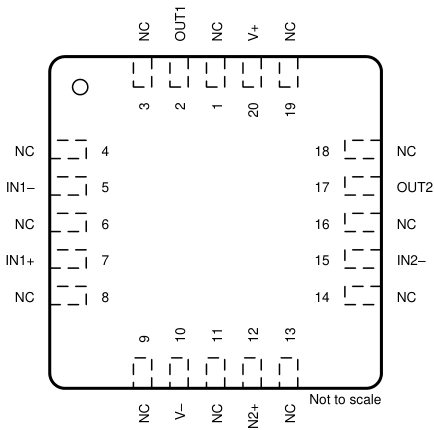
NC - No internal connection Figure 4-2. FK Package 20-Pin LCCC Top View

NAMELCCC(1)^{(1)}SOIC, SOT23-8, VSSOP, CDIP, PDIP, SO, TSSOP, CFP(1)^{(1)}I/ODESCRIPTION
IN1–52INegative input
IN1+73IPositive input
IN2–156INegative input
IN2+125IPositive input
OUT121OOutput
OUT2177OOutput
V–104Negative (lowest) supply or ground (for single-supply operation)
NC1, 3, 4, 6, 8, 9, 11, 13, 14, 16, 18, 19No internal connection
V+208Positive (highest) supply

Why “can Claude read PDFs?” is the wrong first question

People type “claude code read pdf” because the official docs and a pile of Reddit threads disagree in public. Anthropic’s product can attach PDFs in some surfaces. Claude Code, in the loop you actually run on a repo, is a file agent. It is excellent at spec.md. It is average at a 68-page vendor PDF with a pinout on page 3 as an image.

Cursor users hit the same wall: “cursor read pdf” is a forum genre. Extensions that open a PDF pane do not put the table into the model’s working set as a table. A Skill named after PDFs is a competitor product; this page is not that Skill, and the heading will not use that name.

The sequence is boring on purpose. Parse. Commit. Mention the file. If the agent invents a 5 V rating that the table does not contain, you have a Markdown diff to argue with, not a screenshot.

Put the datasheet in the repo as Markdown

A chip datasheet is a test of the pipeline: absolute-maximum table, pin function table, package drawing, units in microamps. The demo uses a short excerpt of the TI LM358 family (pages 1–3 only, vendor copyright, not the full manual). After parse, feature bullets and application lists should still be lists, and units should remain math.

Name the file after the part (lm358.md) and keep the excerpt small. Do not check in a manufacturer’s entire PDF if your license does not allow it. The marketing site will not host the 68-page original.

From Claude Code: @lm358.md then “list supply range and packages as a table.” From Cursor: same file, same ask. Codex and other repo agents follow the same rule — they need bytes they can tokenize as text.

Demo: pin tables and units

Left: the excerpt PDF. Right: the parsed Markdown, including feature bullets and application lists. Image hotlinks in the parse output point at KolmoPDF’s figure store when the parser emitted them.

This is not a replacement for SPICE or for TI’s own HTML. It is the missing step before an agent writes a comment that cites a current limit.

What this page will not sell

We will not title the page after another company’s PDF Skill. We will not claim Claude cannot read any PDF anywhere — Chat surfaces change. We will not turn a lab meeting into this URL; developers feeding specs and students presenting papers are different searches.

If you already have text-layer PDFs with simple paragraphs, you may not need us. The gap is tables, scans, and equations that must survive into the repo.

A week in a repo that actually cites the datasheet

Monday: someone drops a vendor PDF in Slack with “can we support this part?” Tuesday: an intern pastes a screenshot into ChatGPT and gets a confident current limit that belongs to a different suffix of the family. Wednesday: Claude Code writes a driver comment that cannot be grepped against the table because the table never entered git.

The fix is not another chat window. The fix is a file. Parse the excerpt. Name it after the orderable device. Open a pull request whose only job is “add lm358.md.” Then the agent conversation becomes boring in the useful way: “according to lm358.md, BA version offset is 2 mV at 25 C — generate a constant and a test name.” If the Markdown is wrong, you fix Markdown. If the agent is wrong, you point at a line.

Cursor users should do the same even if they never type Claude. Indexing a PDF pane is not the same as indexing a table. Codex, copilot-style repo agents, and internal wrappers all tokenize files. They do not magically OCR a pinout. “Claude code read pdf” is the query; the product of the query is still a file in the tree.

Scanned application notes are worse than born-digital datasheets. If page 3 is a photograph of a table, a text-layer assumption fails. That is the same class of problem as a French tender scan, just with microamps instead of lots. KolmoPDF is the parse step. This Solutions host does not run the job; the button goes to kolmopdf.com/pdf-to-markdown with campaign tracking.

Licensing still matters. Do not publish a manufacturer’s full book on a marketing site. Do not commit a forbidden PDF into a public GitHub. An excerpt for a demo, a customer-licensed PDF in a private repo — those are different. The three-page LM358 slice on this page is labeled as an excerpt on purpose.

API users who convert dozens of specs a night should skip the UI and hit the parsing API. The landing page exists so a developer who googled the pain finds a sequence, not a Skill brand, not a lecture on “what is Markdown.”

Limits: what still fails after a clean parse

Schematics as drawings stay drawings. A parse will not produce a netlist. SPICE models that live only as encrypted blobs stay vendor tools. Mechanical drawings with a forest of dimensions may need the PDF open beside the Markdown, because a table of inches is not the same as a geometric constraint.

Multi-column application notes sometimes still shuffle a caption. You look at the before/after on this page and you keep the original PDF in the same directory as spec.md. The agent can be told “if Markdown and PDF disagree, stop.” That instruction is only possible when both files exist.

This URL is not a lab meeting guide and not a medical journal club. It is not “explain this paper.” Students presenting Attention Is All You Need belong on a different scene later. Mixing those intents would steal this title from the people who pay for API volume.

Can Claude read PDFs? Sometimes, in some products, on some days. Claude Code, in the loop that edits your tree, reads files. Give it one.

A last practical note. Keep the excerpt and the Markdown side by side in the same folder so a reviewer can open both. If a pin name in spec.md does not appear in the PDF, stop and re-parse that page. Do not let the agent invent a package variant because a screenshot was blurry. Cursor, Claude Code, and Codex all fail the same way when the table never entered git. The query is “claude code read pdf.” The artifact is a small Markdown file you can diff. That is the whole product insertion on this page. Everything after — driver stubs, test names, comments that cite a current limit — is your repo, not this marketing host.

If you convert a stack of datasheets every week, skip the browser and use the parsing API. If you convert one part tonight, use the button on this page. Either way, the file that lands in git is Markdown with tables, not a screenshot in Slack. That is how Claude Code reads a PDF in practice: it does not. It reads the file you parsed.

Checklist before you @file the agent

Confirm the Markdown table matches the datasheet excerpt. Confirm units still look like math, not smashed words. Commit spec.md next to a short PDF slice, not the full vendor book. Then mention the file in Claude Code or Cursor. If the agent cites a current limit that is not in spec.md, stop and fix the file first.

Questions

Can Claude read PDFs?

Some Claude products accept PDF attachments. Claude Code, as a repo agent, is far more reliable when the spec is Markdown in the project. Parse first, then @file.

Does this work with Cursor?

Yes. Cursor’s PDF threads are the same failure mode: the model never got the table. Put result.md in the workspace.

Is this a Claude PDF Skill?

No. It is a parse step into your git tree. Do not search this page for that product name as a heading.

May I upload a full vendor manual?

Follow the vendor’s license. This demo is a three-page excerpt for illustration only.

What about the API?

If you batch datasheets, use the parsing API on kolmopdf.com. This Solutions host does not run jobs.